Adaptify Publishing Upgrades Are Here: Branded Plugins, Issue Alerts, Easier Manual Setup



Hello there,
You know that feeling when a workflow is “fine” until you have to set it up for the 12th client site this week… and suddenly you are negotiating with a WordPress plugin like it’s a hostage situation?
We just rolled out a batch of updates designed for agencies who are juggling multiple client sites, multiple team logins, and exactly zero patience for silent publishing failures. The theme is simple: protect your brand, cut onboarding friction, and resolve issues earlier so your clients never have to be the ones who notice first.
Ready? Let’s go see what’s new!
💘 Ready to make your clients fall in love with your agency this Valentine’s Day? Start a 7-day free trial, or book a demo to discover how easy it is to wow your clients and close more deals—faster! Get started today! 💘
WordPress setup: Branded, Self-Updating Plugin + Less Client-Side Awkwardness This is a big one for agencies.
You can now generate a white-labeled, custom WordPress plugin directly inside your account. You choose the plugin name and author name, download a ZIP, and install it on client sites. The plugin is self-updating, so future updates show up like normal WordPress plugin updates.
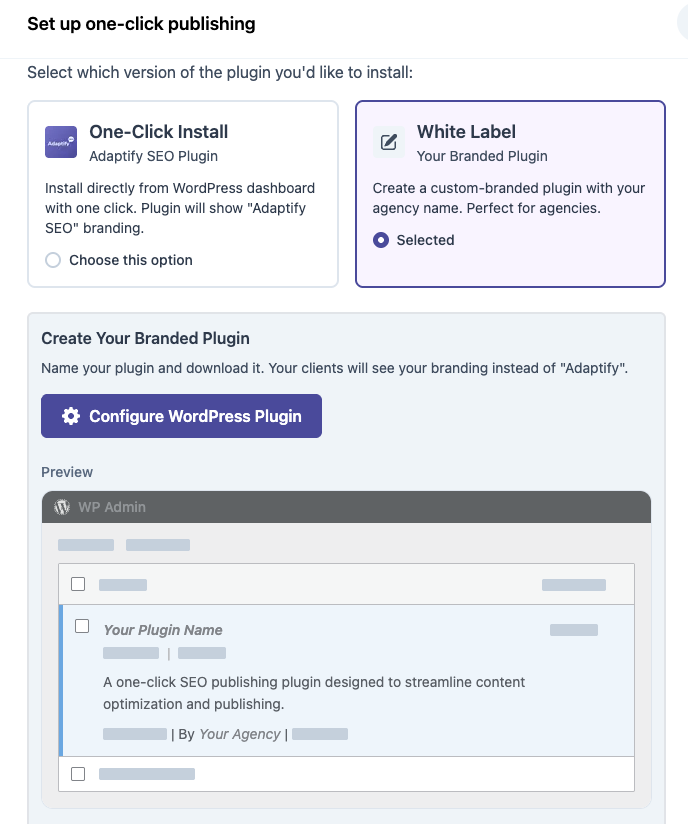
Why this matters:
Your client doesn’t see Adaptify branding in the WordPress plugins list. You can standardize your setup across all client sites without reinventing the wheel each time. Branding is saved at the team level, so once one person configures it, everyone on your team can use it. Once you’ve created your custom branded WordPress plugin, you can view and manage everything in one place by going to MyAccount → WordPress Plugin
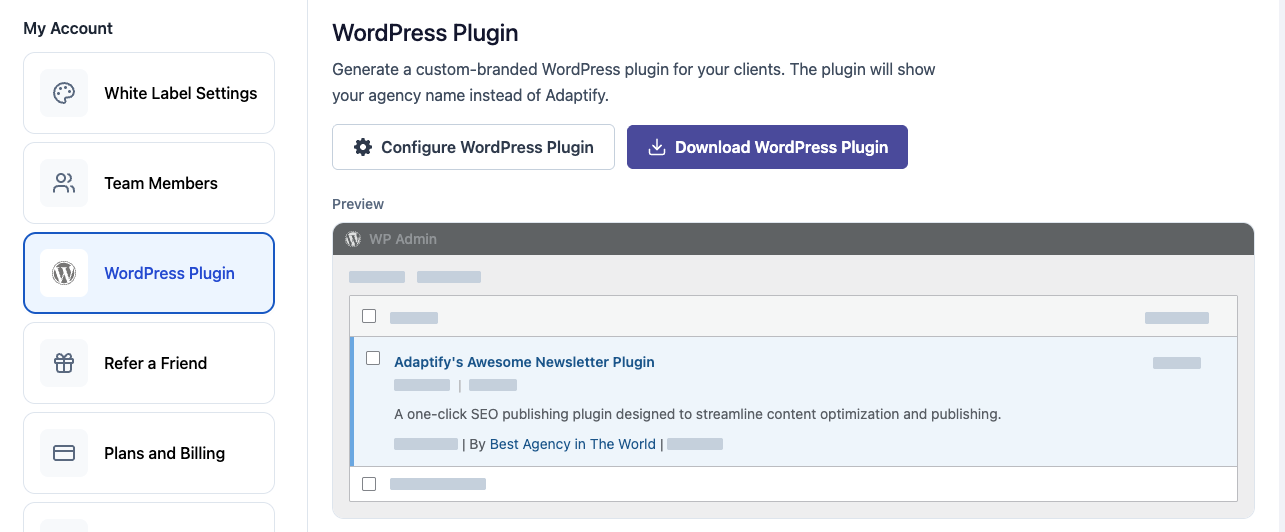
The full WordPress setup flow and troubleshooting guide has also been updated to include everything you need to know. Find it here: Adaptify WordPress Settings
Publishing Issue Detection: No More Quiet Failures Previously, if something failed to publish, it could fail quietly and you might only catch it later if you happened to notice a gap or error in the calendar.
Now, when there’s a publishing issue, you’ll see a “Publishing issues” indicator in your site list that makes it much easier to catch problems early and address them before a client asks why posts “stopped.”
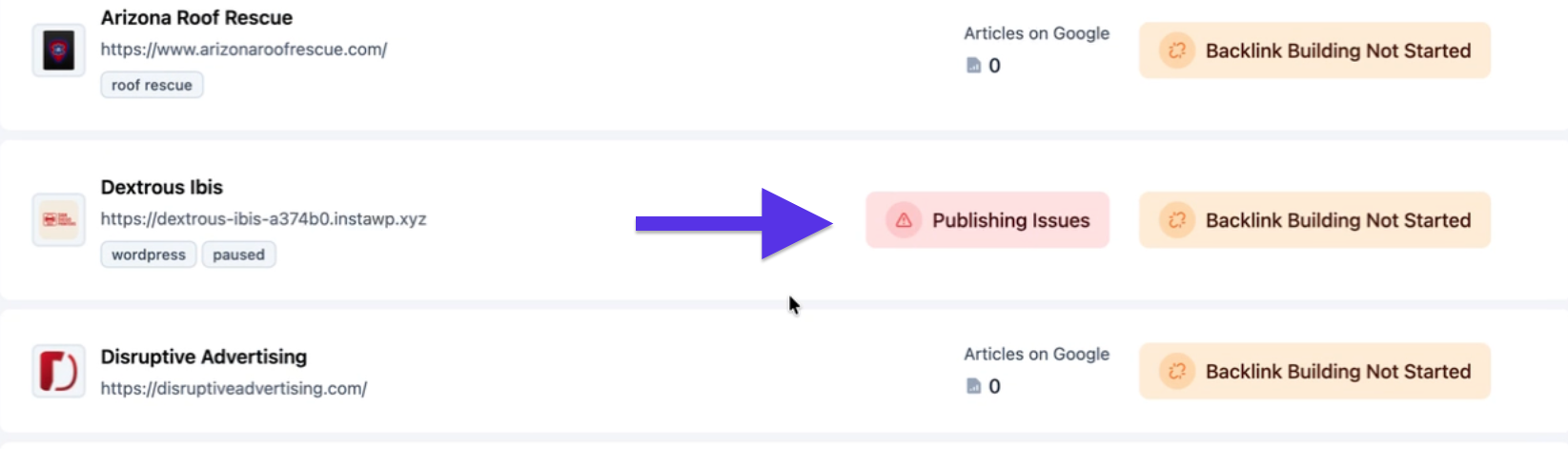
Agency value add: fewer surprise emails, fewer last-minute scrambles, and fewer “we swear it was scheduled” investigations.
WordPress Metadata: Authors, Categories, Tags (and how to keep it clean) We also tightened up the real WordPress publishing details that agencies care about when you’re trying to keep client sites consistent.
Now, from the “overview” tab of any WordPress article, we will try to pull WordPress data so you can publish with the right attribution and taxonomy every time:
Authors (WordPress users with Contributor access or above) Categories Tags (when tags exist on the site)
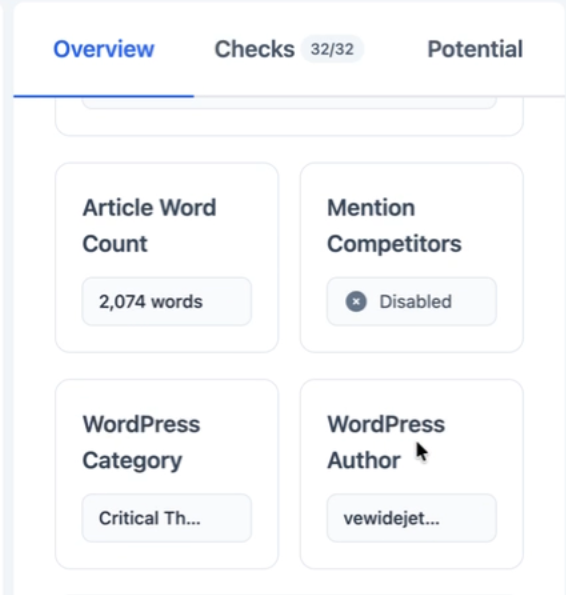
If you add new authors/categories/tags in WordPress and don’t see them right away, you can use Refresh in the article details to re-sync.
One extra win for agencies who share the white-label portal with clients: clients can now filter and view content by author directly inside the portal. This makes it easier for them to review what’s being published under their name quickly. It’s a small UI detail, but it goes a long way toward reducing “can you pull a list of posts by X?” requests.
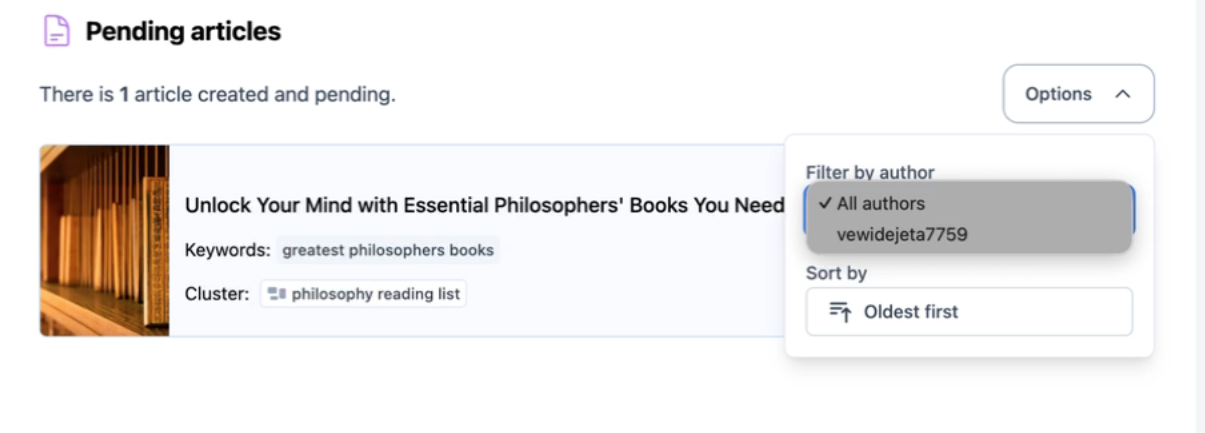
One best practice that will save you time later: if you want consistent category assignment, such as always publishing to your “blog”, create the categories in WordPress first. This will ensure more predictable category and publishing behavior.
All the details are included here: Adaptify WordPress Settings
💡 Agency SEO Tip of the Week: Before You Panic, Check the Category
If you want fewer “the post published but I don’t see it on the blog page” moments, standardize one blog category per client site (like “Blog” or “Insights”) and make sure it exists in WordPress before publishing. A lot of themes filter what they display, and category consistency makes publishing and troubleshooting a breeze.
Manual Publishing: Easier Setup, Less Back-and-Forth with Clients Manual Publishing is the “it just works” option when automated integrations aren’t possible or practical. This is especially true for Wix and Squarespace, and for locked-down WordPress or Shopify environments.
We’ve recently rebuilt the setup experience so it’s more intuitive and much less tedious:
Manual Publishing setup is now native inside the platform, gone are the days of the external form link. The request form is clearer and prompts for what we actually need (login URL, invite screenshot, author name, notes). Agencies also now have a “Share With Customer” link that opens a white-labeled version of the same form, so clients can submit access details themselves. This removes a lot of the back-and-forth that slows onboarding down.
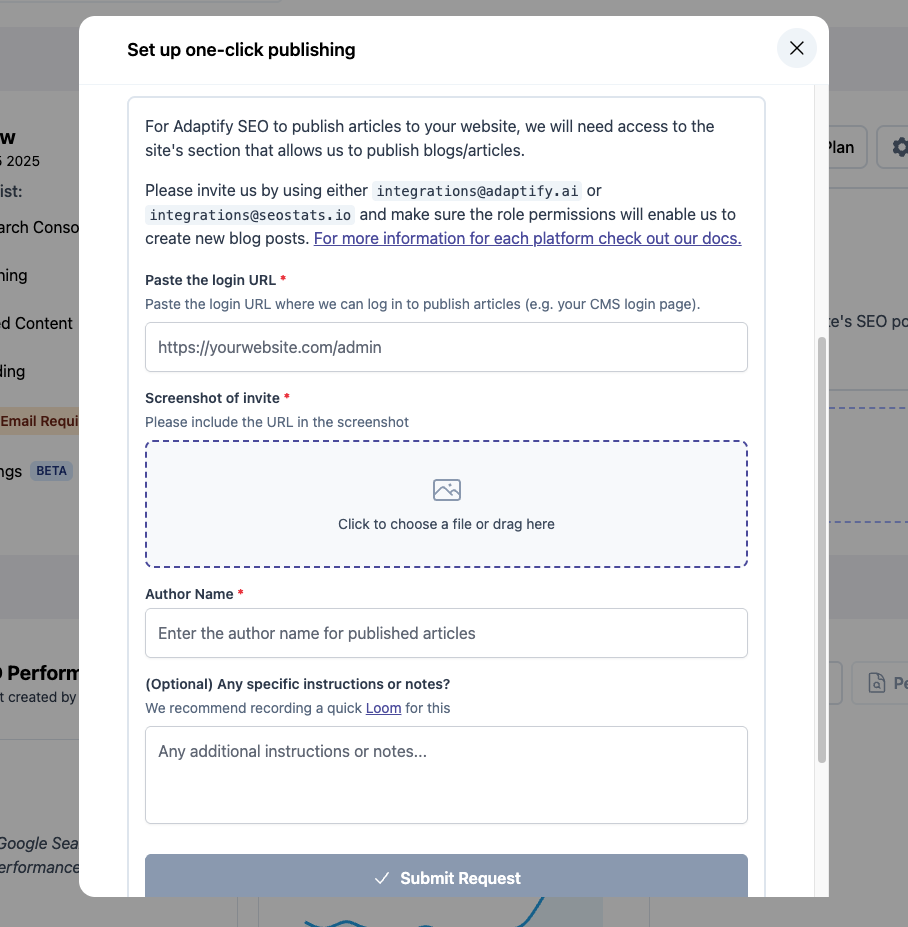
Need more details? Check out our full integration documentation here: Manual Publishing Integration
Agency value add: if you manage client relationships where you do not control admin access, this helps you move forward without waiting on three rounds of “can you resend that invite screenshot?”
White-label Settings: No Longer Admin-only White-label settings used to be an admin-only job. Now any team member can update them, which is a big quality-of-life upgrade when you’re onboarding as a team or dividing and conquering across clients.
A couple quick notes:
These settings are shared across your team, so once they’re configured, everyone sees the same branding. To prevent accidental overwrites, after someone saves changes, settings lock for 5 minutes. Translation: if you’re setting things up together, pick one person to do the settings and you’ll avoid the lock entirely.
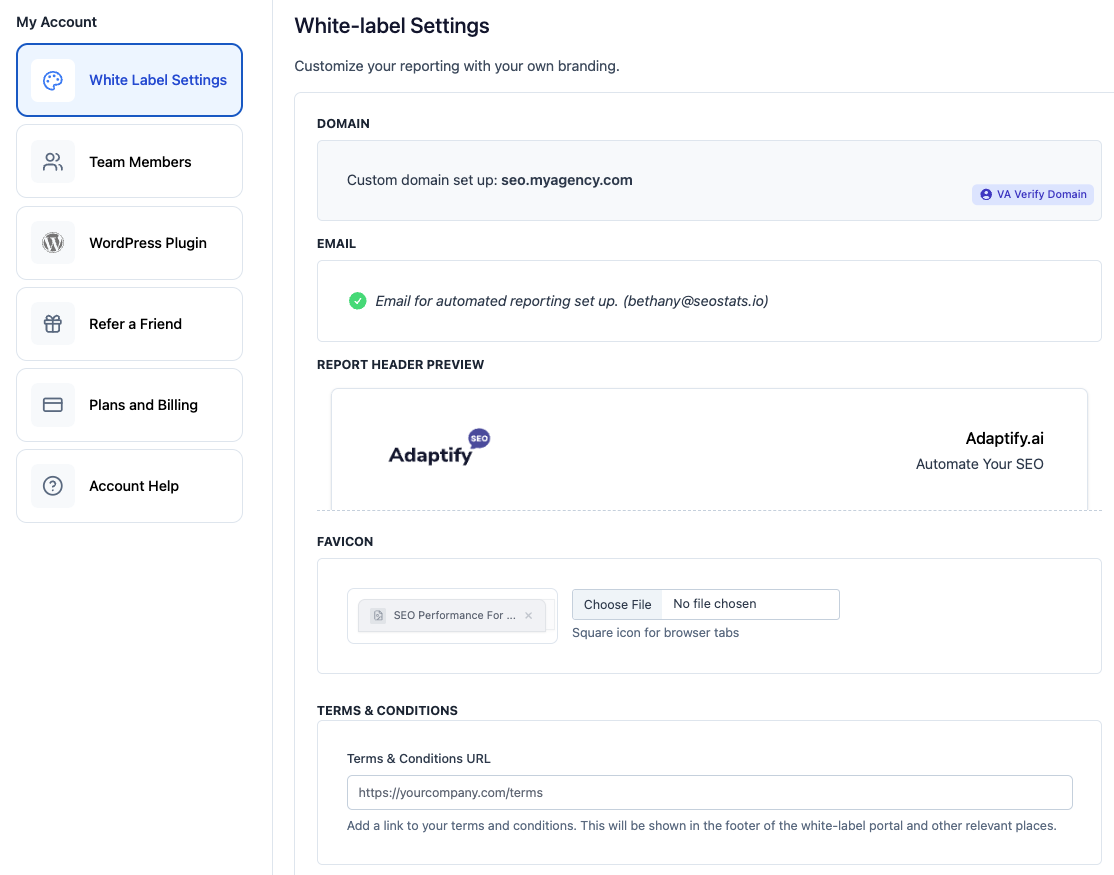
If you want the full breakdown of what you can brand (client portal header, report logo/title/subtitle, favicon, brand color, terms link for the footer, plus optional custom domain), it’s all here: Adaptify White-label Settings
Agency value add: this is one of those “small change, big impact” improvements because it makes the client-facing experience consistent even when multiple people on your team are touching the account.
Publishing Without the Panic These updates are all in service of the same goal: smoother onboarding, fewer publishing headaches, and a client-facing experience that looks like your agency built it.
Want to know more about how smooth our onboarding process can be? Visit Adaptify.ai today or Schedule a demo!
And if a WordPress plugin ever starts acting like it’s holding the site hostage again, reply here and loop me in. I’m happy to help negotiate.
Until next time!
Best,
Dominic, Hans, Bethany
Automate your Agency (by Adaptify SEO)

Stop Flying Blind with These Top SEO Monitor Tools - Learn about seo monitor tools

Learn what is local SEO and how to dominate Google Maps, drive foot traffic, and grow your business with this complete optimization guide.

Going Local and Winning Big with the Best SEO Keywords - Learn about local keywords
Join 1,000+ agencies already delivering SEO and AI visibility from a single platform without increasing their headcount.Join 1,000+ agencies already delivering SEO and AI visibility from a single platform without increasing their headcount.