Beyond the Basics:Everything You Need to Know About SEO Reporting Systems
Hansjan Kamerling
Feb 2, 202616 min read
Why Your Agency Needs a Smarter Way to Report SEO Performance
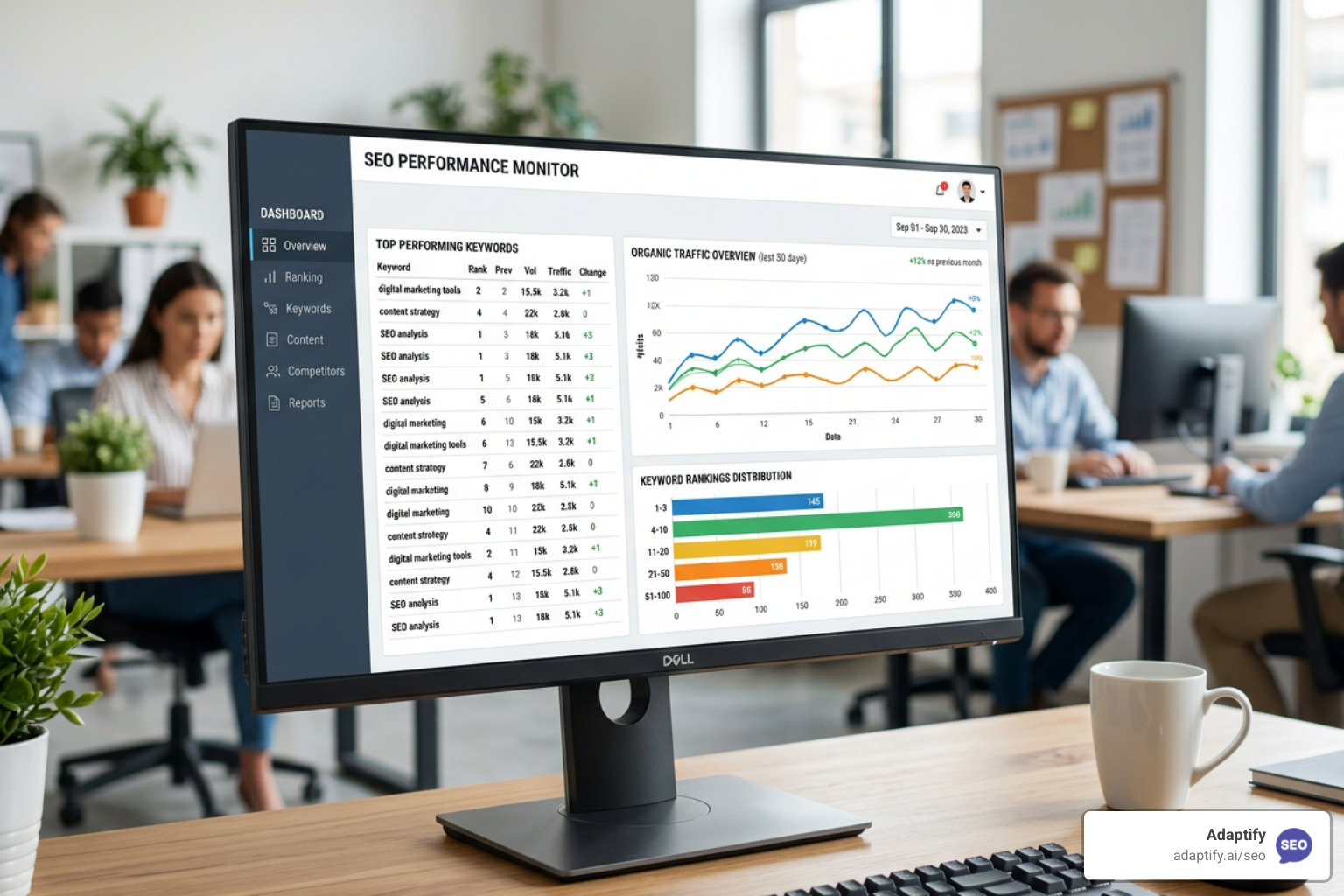
SEO reporting system dashboard - SEO reporting system
An SEO reporting system is a platform that automates the collection, analysis, and presentation of SEO data from multiple sources—turning raw metrics into actionable insights. Here's what a modern system should include:
Automated Data Collection: Pulls data from Google Analytics, Search Console, rank trackers, and backlink tools
Key Metrics Tracking: Monitors organic traffic, keyword rankings, backlinks, conversions, and technical health
Custom Dashboards: Visualizes data with charts, graphs, and branded reports
Integration Capabilities: Connects to 50+ marketing platforms for unified reporting
Client-Ready Reports: Generates white-label, automated reports with scheduled delivery
Do your team members lose entire days piecing together client reports? Many agencies waste over 40 hours monthly copying data from various SEO tools, Google Search Console, and Google Analytics into spreadsheets, then formatting it all for each client.
Excel falls short for scaling agencies: it's time-intensive, error-prone, and doesn't scale. Dated chart aesthetics can also hurt credibility. In contrast, dedicated SEO reporting software can cut reporting time by 80%—finishing in minutes what takes hours in Excel.
But it's more than just saving time. Clients today demand insights beyond rankings or traffic stats. They want reports that tell a story: what changed, why it occurred, and what actions follow. Quality reporting makes the difference in client retention. When you deliver clear, actionable reports, you build trust and justify fees. Confuse clients with vague data, and they'll question your worth.
The shift to automated insights through purpose-built SEO reporting systems transforms how agencies operate. These platforms consolidate data from multiple sources, provide real-time updates, and offer AI-driven insights that highlight opportunities. They enable agencies to focus on strategy and analysis rather than manual data wrangling.
Data-driven decision making becomes the foundation of your SEO strategy when you have the right reporting infrastructure. Instead of relying on gut feelings, you can track the metrics that truly matter—from keyword rankings and backlink health to user behavior and conversion rates—and make informed adjustments that drive real business results for your clients.
I'm Hansjan Kamerling, and I've spent years helping agencies scale by implementing effective SEO reporting systems. In this guide, I'll show you how to choose, implement, and maximize the value of modern SEO reporting tools for your agency.
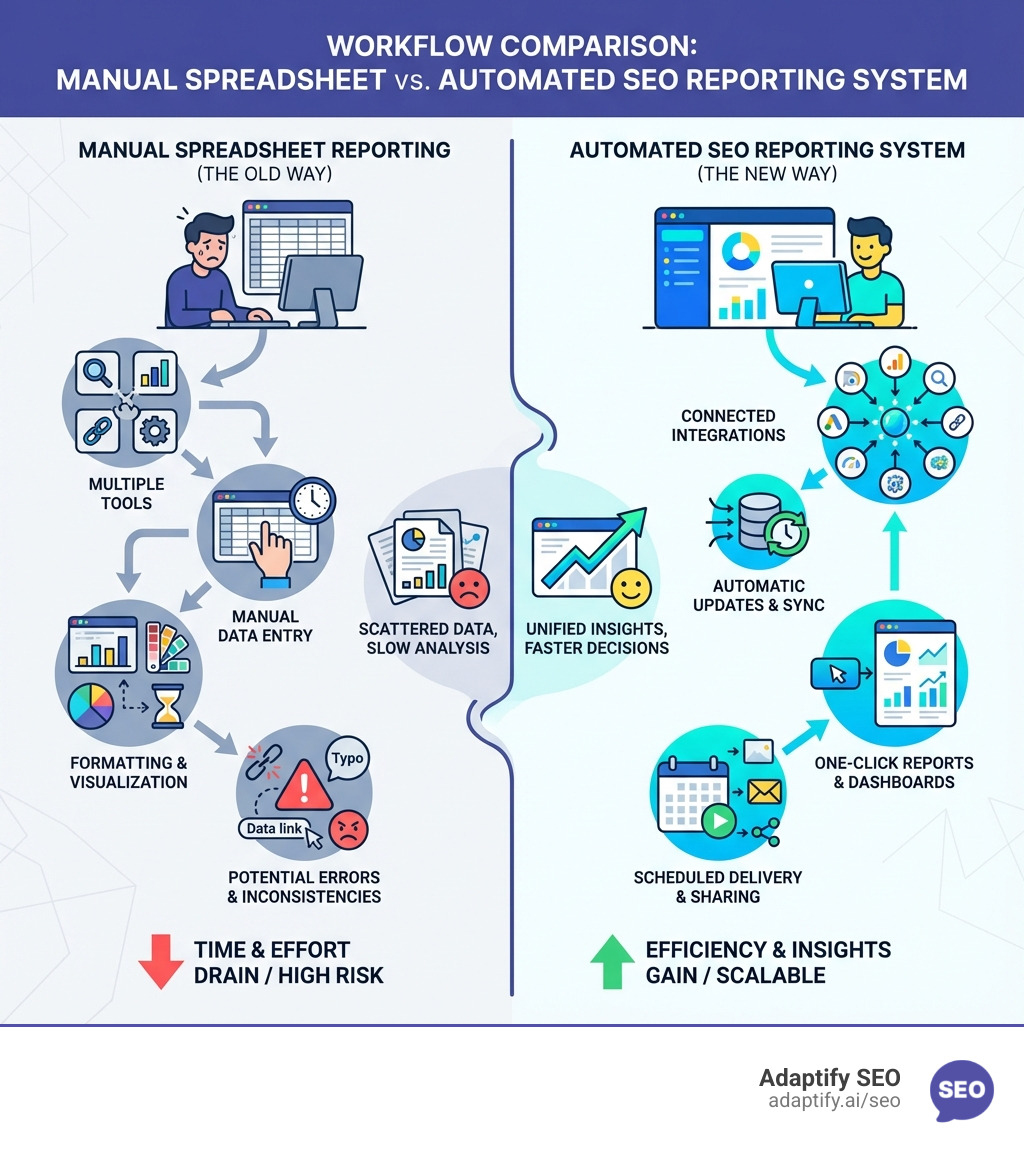
Infographic comparing manual spreadsheet reporting workflow (multiple tools, manual data entry, formatting, errors) versus automated SEO reporting system workflow (connected integrations, automatic updates, one-click reports, scheduled delivery) - SEO reporting system infographic
Core Components of a Modern SEO Reporting System
When I talk about a modern SEO reporting system, I'm referring to a comprehensive solution that goes beyond simple data dumps. It's about having a central hub that brings together all the essential information you need to understand, optimize, and communicate your SEO performance. This means tracking the right Key Performance Indicators (KPIs), leveraging powerful features, and integrating seamlessly with your existing marketing stack.
What are the most critical SEO KPIs that reporting tools should track?
To truly understand a website's performance and make informed decisions, your SEO reporting system needs to track a diverse set of KPIs. Here are the ones I consider non-negotiable:
Organic Traffic: Beyond raw numbers, track total and unique organic clicks, new users, sessions, average engagement time, and bounce rate. These trends reveal overall website visibility and content effectiveness.
Keyword Rankings: How are your target keywords performing? A robust SEO reporting system should track rankings across various search engines (Google, Bing) and contexts like Google Mobile and Local Pack. The ability to monitor thousands of keywords is crucial.
Backlink Profile Health: Backlinks are a significant signal of a website's authority. Focus on the quality of linking domains, not just the quantity. Your system should track new and lost links, domain authority, and help identify low-quality links. You can find more info about backlink analysis.
Domain Authority: This metric gives a quick snapshot of a website's overall strength. Tracking its progression helps gauge the long-term impact of SEO efforts.
Click-Through Rate (CTR): A high CTR indicates that your titles and meta descriptions are compelling. My reports highlight CTR to ensure we're not just ranking, but also attracting clicks.
Conversions & ROI: SEO should drive business results. Track conversions (e.g., form submissions, purchases) and calculate the Return on Investment (ROI) to demonstrate the tangible value of your efforts. Google Analytics is invaluable for monitoring conversion goals.
Core Web Vitals: These technical metrics (loading, interactivity, visual stability) are crucial for user experience and directly impact search rankings. A good SEO reporting system integrates these health checks.
User Behavior Metrics: Understanding what users do on a site is critical. Metrics like pages per session and time on page provide insights into content effectiveness and areas for on-site optimization.
Key Features to Look for in an SEO reporting system
When I'm evaluating an SEO reporting system, I look for a suite of features that empower me to get a holistic view of performance and pinpoint areas for improvement.
Website Audits (Technical SEO): The system should include robust site auditing to identify technical issues like crawl errors, broken links, mobile usability problems, and site speed bottlenecks. Powerful desktop crawlers can also be used for deep technical audits.
Backlink Analysis: Understanding a site's backlink profile is paramount. The tool must analyze backlinks, identify link opportunities, and help manage low-quality ones. Look for tools with an extensive and accurate backlink index.
Competitor Analysis Tools: SEO is a competitive sport. I rely on features that allow me to benchmark performance against competitors, uncover their strategies, and identify opportunities they might be missing.
Keyword Research Features: Identifying optimal keywords is the first step in any SEO strategy. My preferred tools offer in-depth keyword research capabilities to find relevant, high-volume, and achievable keywords.
How do SEO reporting tools integrate with other marketing platforms?
A standalone SEO reporting system is like a single puzzle piece – useful, but incomplete. For a truly comprehensive view of digital marketing performance, seamless integration with other platforms is essential.
Native Connectors: I always prioritize tools with native connectors. These reliably pull data directly from various sources without relying on flaky third-party connectors that can break.
Google Analytics: This is indispensable for understanding user behavior, traffic sources, and conversions on your website. My SEO reporting system must integrate deeply with it.
Google Search Console: Providing direct performance data from Google, including impressions, clicks, and rankings, GSC is a non-negotiable integration for any serious SEO.
Google Data Studio (now Looker Studio): For custom, highly visual reports, Google Data Studio is a free and powerful tool that integrates well with most SEO platforms. It allows me to combine data from various sources into dynamic dashboards.
Social Media Platforms (Facebook, LinkedIn): For clients running integrated campaigns, I need to see how social media efforts might influence or be influenced by SEO, pulling data from platforms like Facebook Ads and LinkedIn Ads.
PPC Platforms (Google Ads): Understanding the interplay between organic and paid search is crucial. Integrating with Google Ads helps me see a holistic view of search performance and identify keyword synergies.
Email Marketing Tools (Mailchimp): For broader digital marketing reporting, integrating with tools like Mailchimp allows me to connect email campaign performance with overall website traffic and conversions.
It's impressive how some platforms connect to over 50 marketing platforms, offering a truly unified reporting experience.
How to Choose the Right SEO Reporting System
Selecting the ideal SEO reporting system can feel overwhelming given the myriad of options available. My approach is to always start by understanding specific needs, budget, and business model. There's no one-size-fits-all solution, but there's definitely a right fit for you.
Agencies vs. Individual Businesses: Catering to Various User Needs
The needs of a marketing agency differ significantly from those of an individual business. I always advise tailoring your choice based on these distinctions:
Agency Needs:
White-labeling: This is critical for agencies. My reports need to carry my agency's branding, not the software provider's. It builds trust and reinforces my agency's identity. You can find more info about white-label SEO services.
Scalability: Agencies manage multiple clients. The SEO reporting system must handle this volume efficiently, allowing for easy client onboarding, project management, and reporting automation across the board.
Client Management: Features like client portals, user permissions, and collaborative dashboards are essential for streamlining communication and ensuring clients only see relevant data.
Automated Report Delivery: Manual report generation for multiple clients is a huge time sink. Automated scheduling and delivery of reports is a game-changer, freeing up valuable team time.
In-House/Business Needs:
Deep-dive analytics: Individual businesses often want to dive deep into their own data without the need for extensive client-facing features.
Team collaboration features: Tools that facilitate internal team discussions and task assignments based on report insights are highly valued.
Budget-friendly options: While agencies can often justify higher costs due to client billing, individual businesses might prioritize more economical solutions, including leveraging free tools.
How does pricing vary across different SEO reporting software?
Pricing is a significant factor, and it varies widely across the SEO reporting system landscape. The key is understanding what drives these costs.
Pricing Factors:
Keyword volume: Many tools base their pricing on the number of keywords you track.
Number of projects/clients: Agency-focused platforms often charge per client or project.
Feature tiers: Most software offers different plans (e.g., Basic, Pro, Business) with escalating features.
Per-user costs: For larger teams, some platforms charge per user, which can add up.
Generally, monthly subscriptions for comprehensive solutions can start from under $50 and go up to several hundred dollars for more robust plans. Annual billing often comes with a discount, which I always recommend if you're committed to a platform.
What are the advantages and limitations of free SEO reporting tools?
For those just starting out or working with tight budgets, free SEO reporting system options can be incredibly valuable. However, it's crucial to understand their inherent trade-offs.
Free Tools:
Google Data Studio & Analytics: These are my go-to free tools. Google Analytics provides robust real-time metrics, audience analysis, and visitor behavior insights. Coupled with Google Data Studio, you can create highly customized, visually engaging reports by pulling data from multiple sources.
WordPress SEO Plugins: For WordPress users, popular SEO plugins often offer a dashboard that integrates with Google Search Console, providing feedback within your WordPress environment.
Free Versions of Paid Tools: Many premium SEO platforms offer free versions or webmaster tools. These provide limited access to powerful site explorer and audit features, letting you see major SEO metrics for your own sites.
Limitations:
Manual setup: While free, these tools often require more manual effort to set up integrations and assemble reports.
Lack of automation: You'll typically need to manually export data and combine it, which defeats the purpose of an automated SEO reporting system.
Limited features: Free versions naturally come with feature restrictions compared to their paid counterparts.
No dedicated support: You'll often rely on community forums or documentation rather than direct customer support.
Overall, free tools provide essential data but demand more of your time and expertise to turn that data into actionable insights.
From Data to Decisions: Using Reports to Fuel Growth
The real power of an SEO reporting system isn't just in collecting data; it's in changing that data into actionable intelligence that drives growth. This is where strategy comes into play, turning numbers into narratives that explain "what happened" and "what to do next."
How can an SEO reporting system help in identifying areas for improvement?
A well-configured SEO reporting system acts like a diagnostic tool, constantly scanning for opportunities and red flags. Here's how I use it to pinpoint areas for improvement:
Identifying Content Gaps: By analyzing keyword performance and comparing it against competitors, I can spot topics or keywords where my client's content is missing or underperforming. Some tools can even calculate a "Content Score" to show optimization levels.
Pinpointing Technical SEO Issues: My system runs regular site audits that flag issues like broken links, crawl errors, slow page loads, and mobile usability problems. Addressing these technical problems, including Core Web Vitals, is foundational to good SEO.
Understanding User Behavior Impact: Google Analytics data, integrated into my SEO reporting system, reveals how users interact with the site. If a page has high traffic but a low time-on-page or high bounce rate, it signals content or UX issues that need attention.
Optimizing for Google's helpful content guidelines: My reporting helps me ensure content is providing tangible value and demonstrates expertise. If content isn't performing, it could be a sign it doesn't meet these crucial guidelines. You can find more info about content strategy.
How do SEO reporting tools assist in competitor analysis and benchmarking?
In SEO, you're always playing against others. An SEO reporting system isn't just about your site; it's about understanding the entire competitive landscape.
Keyword Gap Analysis: I use tools to identify keywords where competitors rank, but my client doesn't. This uncovers untapped opportunities for content creation.
Backlink Gap Finding: Similarly, I look for websites that link to my competitors but not to my client. This reveals potential link-building prospects.
Share of Voice Tracking: This metric helps me understand my client's visibility in the SERPs compared to their top competitors, giving a broader picture of market presence.
Monitoring Competitor Rankings: Keeping an eye on competitor keyword performance helps me react to their strategies and identify shifts in the market.
Using a domain overview feature: Many platforms allow you to plug in multiple domains for a quick, comprehensive comparison of their organic and paid traffic, top keywords, and backlink profiles. This provides a cheat sheet on what the competition is doing right (or wrong!).
How can agencies leverage software to improve client relationships and demonstrate ROI?
For agencies, the SEO reporting system is a powerful tool for client retention and growth. It's not just about showing numbers; it's about proving value and building trust.
Telling a story with data: Clients don't want a spreadsheet; they want a narrative. My reports focus on explaining what the data means for their business, what actions were taken, and what the results were.
Aligning SEO with business goals: I ensure every report ties back to the client's overarching business objectives. If their goal is lead generation, I highlight conversion rates. If it's brand awareness, I focus on organic traffic and visibility.
Building trust with transparent reports: Clear, actionable reports foster transparency and build confidence. When clients understand exactly what you're doing and the impact it's having, they're more likely to trust your expertise.
Creating compelling SEO proposals: A robust SEO reporting system provides the data to craft persuasive proposals, showcasing potential ROI and outlining a clear strategy based on real insights.
Justifying fees and retaining clients: Quality reporting is the backbone of client retention. When you consistently demonstrate how your work boosts revenue and improves visibility, you justify your fees. For instance, data-driven SEO strategies can lead to dramatic growth in organic traffic and conversions, and that kind of evidence speaks volumes!
Crafting Actionable Reports and Preparing for the Future
The final step in maximizing your SEO reporting system is to ensure your reports are not just informative, but truly actionable. And looking ahead, I'm always keeping an eye on the emerging trends that will shape the future of SEO reporting.
What role does data visualization and customization play in effective reporting?
Data is only as good as its presentation. Effective data visualization and customization are paramount for engaging clients and internal teams.
Custom Dashboards: One size rarely fits all. I create custom dashboards custom to each client's specific KPIs and preferences. This ensures they see the most relevant information at a glance.
Interactive Charts & Graphs: Static tables are boring. Interactive charts and graphs make data come alive, allowing users to explore trends and drill down into details.
White-Label Branding: For agencies, white-labeling is a must. All reports should carry your agency's logo, colors, and branding. It reinforces professionalism and makes the report feel like a seamless extension of your service.
Tailoring reports to the audience: I always adjust the level of detail based on who's reading the report. A C-suite executive wants a high-level overview of business impact, while a marketing manager might need more granular technical details.
What are the best practices for creating impactful SEO reports that drive action?
Creating a report that actually drives action requires more than just compiling data. It’s about communication and strategy. Here are my best practices:
Start with an Executive Summary: Begin with a concise overview of key achievements, challenges, and next steps. This is crucial for busy executives.
Focus on Insights, Not Just Data: Don't just present numbers. Explain what those numbers mean. For example, instead of "Organic traffic increased by 15%," say "Organic traffic increased by 15% due to improved rankings for high-intent keywords."
Provide Clear, Actionable Recommendations: Every insight should be followed by a concrete recommendation. What specific steps need to be taken based on the data?
Set and Track SMART Goals: Ensure your reports are aligned with Specific, Measurable, Achievable, Relevant, and Time-bound goals. This demonstrates progress and keeps everyone focused.
Automate Delivery: Set up automated delivery schedules (daily, weekly, monthly) to ensure consistency and save time. This also keeps clients regularly informed without manual effort.
What are the emerging trends in SEO reporting technology?
The SEO landscape is constantly evolving, and so too are the tools we use to report on it. I'm particularly excited about these emerging trends:
AI-Powered Insights & Summaries: This is a huge one. AI is moving beyond just data collection to provide contextual insights. Imagine asking your SEO reporting system, "Which keywords dropped rankings last week?" and getting an instant, intelligent answer. AI-powered features are already doing this, generating contextual insights based on actual data.
Predictive Analytics for forecasting traffic: Tools are starting to leverage historical data and machine learning to forecast future traffic and ranking potential, helping us make more proactive strategic decisions.
Increased Automation: The drive for automation will continue, streamlining everything from data blending and custom metric creation to the standardization of messy data.
Recent studies show that a majority of companies generate better SEO results with AI tools. This statistic underscores the growing importance of AI in our field, not just in reporting but across the entire SEO workflow.
Voice Search & Visual Search Analytics: As search behaviors evolve, our reporting systems will need to adapt to track performance in these emerging areas.
Frequently Asked Questions about SEO Reporting Systems
I often get asked similar questions about SEO reporting systems, so I've compiled some of the most common ones here.
What are the main benefits of using SEO reporting software over spreadsheets?
The main benefits are significant time savings (up to 80%) through automation, reduced human error, and deeper insights from integrated data sources. You also get better data visualization and scalability to manage growth, which manual spreadsheets can't easily replicate.
How often should I generate SEO reports?
For agencies and clients, monthly reports are the gold standard for strategic reviews. These provide enough time for significant changes to occur and for the impact of your efforts to be measurable. For more dynamic performance tracking, I recommend supplementing these with weekly dashboards. For internal teams, real-time dashboards are ideal for day-to-day monitoring.
Can SEO reporting tools help improve my search rankings?
Indirectly, yes. An SEO reporting system doesn't directly optimize your website, but it provides the critical data and insights needed to do so. It helps you identify technical issues, uncover content opportunities, track keyword performance, and analyze competitors. All of this information is invaluable for informing and refining your SEO strategy, which in turn leads to improved search rankings.
Conclusion: Automate Your Reporting, Lift Your Strategy
An effective SEO reporting system is more than a tool; it's a strategic asset. By automating data collection, you free up valuable time to focus on what truly matters: analyzing insights and making decisions that drive growth. For agencies, this means delivering more value, strengthening client trust, and scaling operations efficiently. Platforms like Adaptify.ai are at the forefront of this shift, integrating AI and automation to streamline the entire SEO workflow, from strategy formulation and content creation to PR link building.
It's time to move beyond the manual grind and accept a smarter, more efficient way to manage your SEO.
Join 1,000+ agencies already delivering SEO and AI visibility from a single platform without increasing their headcount.Join 1,000+ agencies already delivering SEO and AI visibility from a single platform without increasing their headcount.