New This Week at Adaptify: Smarter Proposals + Full Article Editing



Hello there,
It’s that weird but wonderful stretch between Halloween candy and Thanksgiving leftovers which means we figured it’s the perfect time to serve up something to make your holiday’s even sweeter: two Adaptify updates that make your proposals sharper and your content workflow smoother.
Let's go see what's new!
🍂 Make your client's holiday's even sweeter with incredible content. Start a 7-day free trial, or book a demo to discover how easy it is to wow your clients and close more deals—faster! Get started today! 🍂
Proposal Creation Gets a Makeover
Your client proposals just leveled up. Agencies using our Proposal Creator will notice a fresh, more interactive layout designed to make pitching (and closing) clients easier than ever.
Here’s what’s new:

Prefer not to write your own? Just click Suggested Comment and we’ll auto-fill a polished summary for you.
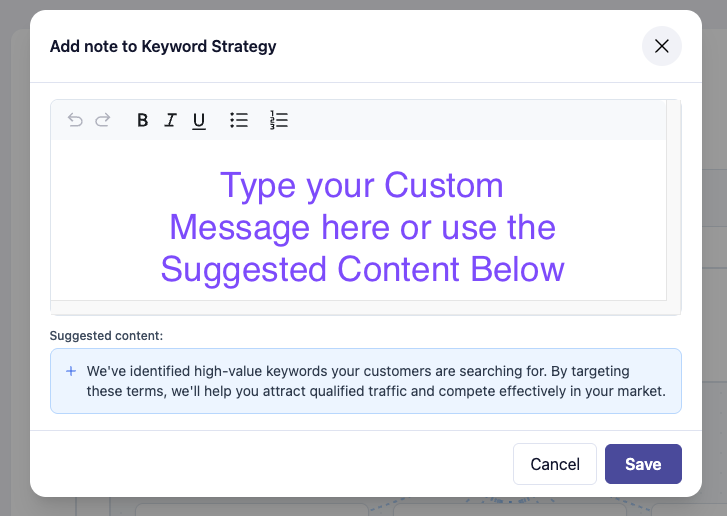

4.Preview Example Articles: Under the Content Plan section, you can now generate partial example articles (about half-length previews) to show clients what kind of content they can expect before signing on.
We’ve put together a quick walkthrough highlighting the new Proposal features from view counters to customizable comment boxes and example articles.
Watch the video below to see how your next proposal can stand out even more:
Exciting Updates to Proposal Features - Watch Video
And for agencies who like to stay ahead: we’ve opened early access signups for upcoming Proposal Beta features, including direct Stripe billing, client testimonial sections, and enhanced personalization modules. If you’d like to shape what comes next, apply from the bottom of any proposal to join the beta group.
Full Article Editing Has Arrived
This one’s been a frequent request and it’s finally here. You can now edit entire articles in one view or even import content created outside of Adaptify.
When you open any article in your Content Plan, click on a section to edit and look for the “Expand to Full Article Editor” icon (two arrows next to the trash can) in the upper right hand corner of the edit box.
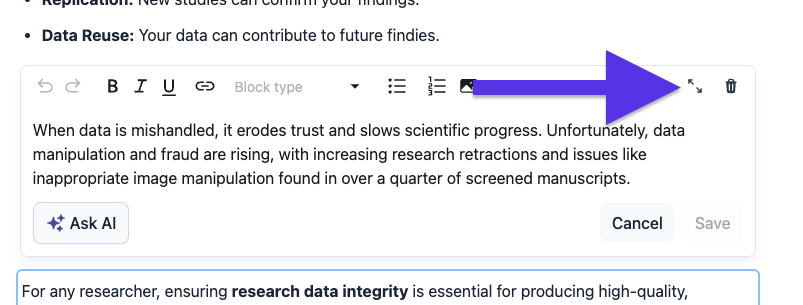
Clicking it opens a full-screen editing mode that feels like working in Google Docs. From there, you can:
Delete or edit multiple sections at once
Copy and paste full text directly
Import client-written content into Adaptify Pro tip: If you’re importing an external article, first create a new piece using the target keyword inside Adaptify, then open it in full editor view to paste your client’s content. This allows Adaptify to process metadata, headings, and images properly.
Want to see it in action? Watch our walkthrough below:
New Editing Features for Articles: Enhanced Control and Flexibility - Watch Video
Wrapping It Up
As you settle into the cozy chaos of November, take a moment to explore these updates.
They're built to make your agency’s workflows smoother, your client experience richer, and your proposals more persuasive.
Want to try it out for yourself? Schedule a demo or visit Adaptify.ai today and let us know your vision.
Until next time,
Best,
Dominic, Hans, Bethany
Automate your Agency (by Adaptify SEO)


Learn how an SEO automation system streamlines keyword research, content workflows, and reporting to scale your search operations efficien...

Discover what SEO tasks seo automation services can realistically automate for faster audits, keyword research, and content optimization.

Stop staring at blank pages. Use the best SEO article writing software to create optimized content that ranks in 2026.
Join 1,000+ agencies already delivering SEO and AI visibility from a single platform without increasing their headcount.Join 1,000+ agencies already delivering SEO and AI visibility from a single platform without increasing their headcount.